
Develop progress bar for AWS S3 file upload using Javascript

13+ Years of experienced as Full Stack Developer. Also worked as architect for building solutions and product to help for automation. Solution-oriented and hands-on technical utility player. Having experience of more than 4 years of experience in E commerce and finance in each domain. Experience in having driving business automation, marketing using technology. Strong follower of open source technology. Used PHP, Python, AWS and Angular as technology stack to build product
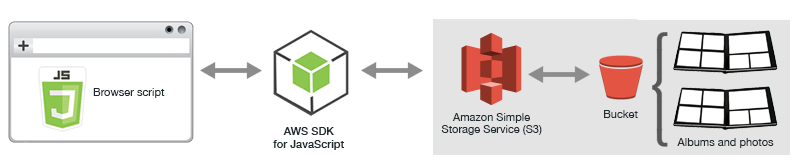
1. Perquisite :
- AWS account
- S3 bucket
- CORS enable for S3 bucket
- IAM user with Secret key and access key
- If you are using federation token then STS token
2. Configuring CORS
Before the browser script can access the Amazon S3 bucket, you must have to first set up its CORS configuration as follows.
S3 bucket -> Permission -> CORS Configuration
<?xml version="1.0" encoding="UTF-8"?>
<CORSConfiguration xmlns="http://s3.amazonaws.com/doc/2006-03-01/">
    <CORSRule>
        <AllowedOrigin>*</AllowedOrigin>
        <AllowedMethod>POST</AllowedMethod>
        <AllowedMethod>GET</AllowedMethod>
        <AllowedMethod>PUT</AllowedMethod>
        <AllowedMethod>DELETE</AllowedMethod>
        <AllowedMethod>HEAD</AllowedMethod>
        <AllowedHeader>*</AllowedHeader>
        <ExposeHeader>ETag</ExposeHeader>
    </CORSRule>
</CORSConfiguration>
3. HTML :
<html>
   <head>
      <title> AWS S3 File Upload Progress Bar</title>
      <link rel="stylesheet" href="styles.css">
      <script src="https://sdk.amazonaws.com/js/aws-sdk-2.693.0.min.js"></script>
      <script src="app.js"></script>
   </head>
   <body>
      <input type="file" id="myFile" multiple size="50" onchange="uploadSampleFile()"><br><br>
      <div id="myProgress" style="display:none;">
          <div id="myBar"></div>
      </div>
   </body>
</html></span>
4. CSS:
#myProgress {  width: 100%;  background-color: grey;}
#myBar {  width: 1%;  height: 30px;  background-color: green;}</span>
5. JS :
var bucket = new AWS.S3({
   accessKeyId: "ACCESS_KEY",
   secretAccessKey: "SECRETE_KEY",
   sessionToken: "SESSION_TOKEN", // optional you can remove if you don't want pass
   region: 'us-east-1'
 });

 uploadfile = function(fileName, file, folderName) {
   const params = {
     Bucket: "BUCKET_NAME",
     Key: folderName + fileName,
     Body: file,
     ContentType: file.type
   };
   return this.bucket.upload(params, function(err, data) {

     if (err) {
       console.log('There was an error uploading your file: ', err);
       return false;
     }
     console.log('Successfully uploaded file.', data);
     return true;
   });
 }

 uploadSampleFile = function() {
   var progressDiv = document.getElementById("myProgress");
   progressDiv.style.display="block";
   var progressBar = document.getElementById("myBar");
   file = document.getElementById("myFile").files[0];
   folderName = "Document/";
   uniqueFileName = 'SampleFile';
   let fileUpload = {
     id: "",
     name: file.name,
     nameUpload: uniqueFileName,
     size: file.size,
     type: "",
     timeReference: 'Unknown',
     progressStatus: 0,
     displayName: file.name,
     status: 'Uploading..',
   }
   uploadfile(uniqueFileName, file, folderName)
     .on('httpUploadProgress', function(progress) {
       let progressPercentage = Math.round(progress.loaded / progress.total * 100);
       console.log(progressPercentage);
       progressBar.style.width = progressPercentage + "%";
       if (progressPercentage < 100) {
         fileUpload.progressStatus = progressPercentage;

       } else if (progressPercentage == 100) {
         fileUpload.progressStatus = progressPercentage;

         fileUpload.status = "Uploaded";
       }
     })
 }</span>
Sample example can find here : Github Example
Note: This code can use in any Javascript or Typescript based framework like Angular or React etc.
Drop a star if you find it useful.
Thank you for reading 🙏🏻
Reference :
https://docs.aws.amazon.com/sdk-for-javascript/v2/developer-guide/s3-example-photo-album.html


