# Develop progress bar for AWS S3 file upload using Javascript
**1. Perquisite** :
* AWS account
* S3 bucket
* CORS enable for S3 bucket
* IAM user with Secret key and access key
* If you are using federation token then STS token
**2. Configuring CORS**
Before the browser script can access the Amazon S3 bucket, you must have to first set up its [CORS configuration](https://docs.aws.amazon.com/sdk-for-javascript/v2/developer-guide/cors.html#configuring-cors-s3-bucket) as follows.
`S3 bucket -> Permission -> CORS Configuration`
```
*POSTGETPUTDELETEHEAD*ETag
```
**3. HTML** :
```
AWS S3 File Upload Progress Bar
```
**4. CSS**:
```
#myProgress { width: 100%; background-color: grey;}
#myBar { width: 1%; height: 30px; background-color: green;}
```
**5. JS** :
```
var bucket = new AWS.S3({
accessKeyId: "ACCESS_KEY",
secretAccessKey: "SECRETE_KEY",
sessionToken: "SESSION_TOKEN", // optional you can remove if you don't want pass
region: 'us-east-1'
});
uploadfile = function(fileName, file, folderName) {
const params = {
Bucket: "BUCKET_NAME",
Key: folderName + fileName,
Body: file,
ContentType: file.type
};
return this.bucket.upload(params, function(err, data) {
if (err) {
console.log('There was an error uploading your file: ', err);
return false;
}
console.log('Successfully uploaded file.', data);
return true;
});
}
uploadSampleFile = function() {
var progressDiv = document.getElementById("myProgress");
progressDiv.style.display="block";
var progressBar = document.getElementById("myBar");
file = document.getElementById("myFile").files[0];
folderName = "Document/";
uniqueFileName = 'SampleFile';
let fileUpload = {
id: "",
name: file.name,
nameUpload: uniqueFileName,
size: file.size,
type: "",
timeReference: 'Unknown',
progressStatus: 0,
displayName: file.name,
status: 'Uploading..',
}
uploadfile(uniqueFileName, file, folderName)
.on('httpUploadProgress', function(progress) {
let progressPercentage = Math.round(progress.loaded / progress.total * 100);
console.log(progressPercentage);
progressBar.style.width = progressPercentage + "%";
if (progressPercentage < 100) {
fileUpload.progressStatus = progressPercentage;
} else if (progressPercentage == 100) {
fileUpload.progressStatus = progressPercentage;
fileUpload.status = "Uploaded";
}
})
}
```
Sample example can find here : [Github Example](https://github.com/aviboy2006/aws-s3-file-upload-progress)
**Note**: This code can use in any Javascript or Typescript based framework like Angular or React etc.
Drop a star if you find it useful.
Thank you for reading 🙏🏻
**Reference** :
[https://docs.aws.amazon.com/sdk-for-javascript/v2/developer-guide/s3-example-photo-album.html](https://docs.aws.amazon.com/sdk-for-javascript/v2/developer-guide/s3-example-photo-album.html)
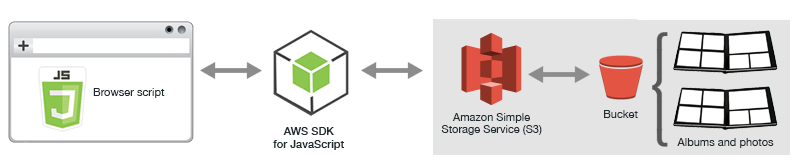 **1. Perquisite** :
* AWS account
* S3 bucket
* CORS enable for S3 bucket
* IAM user with Secret key and access key
* If you are using federation token then STS token
**2. Configuring CORS**
Before the browser script can access the Amazon S3 bucket, you must have to first set up its [CORS configuration](https://docs.aws.amazon.com/sdk-for-javascript/v2/developer-guide/cors.html#configuring-cors-s3-bucket) as follows.
`S3 bucket -> Permission -> CORS Configuration`
```
**1. Perquisite** :
* AWS account
* S3 bucket
* CORS enable for S3 bucket
* IAM user with Secret key and access key
* If you are using federation token then STS token
**2. Configuring CORS**
Before the browser script can access the Amazon S3 bucket, you must have to first set up its [CORS configuration](https://docs.aws.amazon.com/sdk-for-javascript/v2/developer-guide/cors.html#configuring-cors-s3-bucket) as follows.
`S3 bucket -> Permission -> CORS Configuration`
```